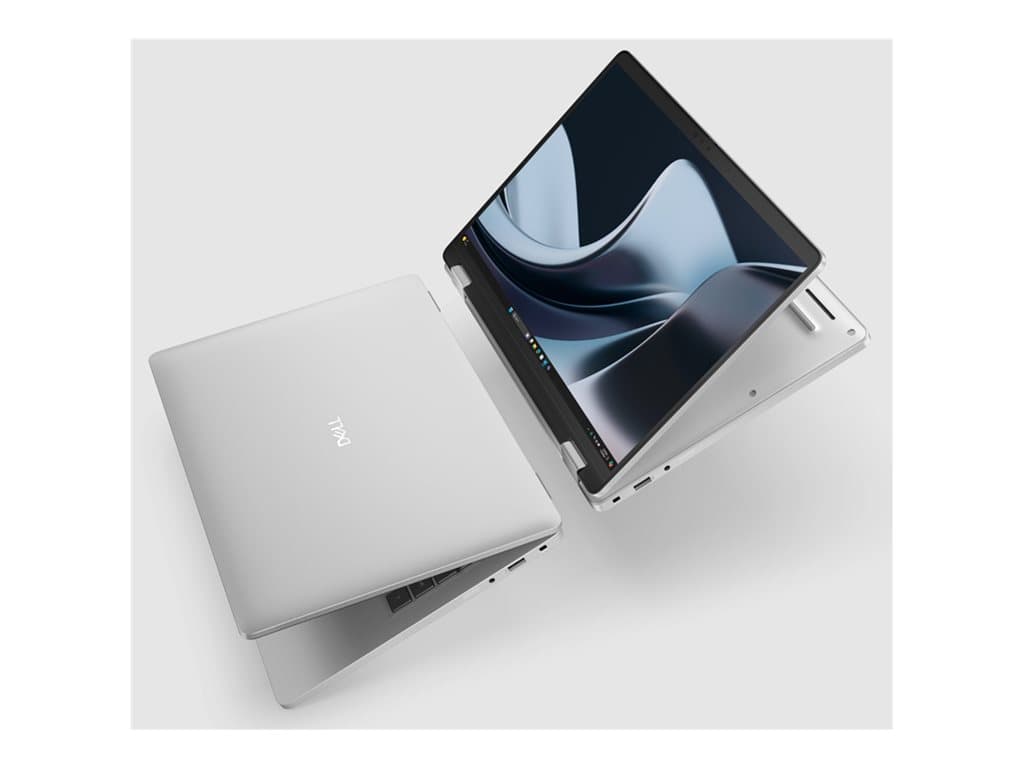
Who is the Dell Pro 14 Plus 2-in-1 for?
The Dell Pro 14 Plus 2-in-1 is aimed at business users who want one Windows computer to work as a conventional notebook and as a touch-oriented device. Its 14-inch FHD+ touch display and convertible form factor may be useful for meetings, presentations, document review and desk-based work. It is a particularly relevant format for managers, consultants, account teams, educators and hybrid workers who regularly change how and where they use a computer.
This model family should not be chosen simply because it can fold into different positions. Buyers should first confirm that touch interaction and the convertible design will support real workflows. A conventional laptop may be the simpler choice for users who spend almost all day typing at a fixed desk. Similarly, the listed integrated graphics are appropriate for mainstream business applications, but the supplied information does not establish suitability for demanding 3D, engineering or specialist graphics workloads.
Verified configurations
The supplier information identifies two refurbished configurations. Part number P14191109 combines an Intel Core Ultra 5 236V processor, 16GB of RAM and a 256GB SSD. It has a 14-inch FHD+ touch display, integrated graphics, Windows 11 Pro and a UK keyboard. The supplier lists a 36-month warranty.
Part number PP14250604 uses an AMD Ryzen 5 PRO 220 processor with 16GB of RAM and a larger 512GB SSD. It also has a 14-inch FHD+ touch display, integrated graphics, Windows 11 Pro, a UK keyboard and a supplier-listed 36-month warranty. The source description additionally identifies WWAN for this AMD configuration. Buyers should ask what WWAN hardware is installed, whether a compatible modem is included and what service or SIM requirements apply rather than assuming mobile connectivity is ready to use.
Supplier descriptions for both listings mention a camera, Wi-Fi, Bluetooth, smart-card functionality, fingerprint recognition, NFC and a backlit keyboard. These details should still be matched to the exact part number and confirmed on the final quotation. The structured colour field is marked unknown, so colour should not be treated as guaranteed. Individual Dell Pro 14 Plus 2-in-1 SKUs can differ, and specifications from one listing should never be automatically applied to another.
Practical strengths for an organisation
The clearest strength is versatility. A touch display can make it easier to navigate presentations, review visual material or work in situations where a mouse is inconvenient. The 2-in-1 format also gives teams more positioning options than a standard clamshell notebook. Whether that benefit justifies the format depends on the applications used and the employee’s working habits.
Both verified SKUs include 16GB of RAM and Windows 11 Pro, creating a sensible baseline for managed office deployments. The choice between 256GB and 512GB of SSD storage matters more than a simple capacity comparison suggests. Employees who mainly use cloud services and centrally managed files may be comfortable with 256GB. Users retaining large local mailboxes, media, project files or offline data will have more headroom with 512GB.
The listed fingerprint reader, smart-card support and NFC may be valuable where an organisation has compatible identity or access systems. They are not interchangeable features, however, and their usefulness depends on company infrastructure and policy. IT teams should verify compatibility with their authentication environment instead of treating the presence of security hardware as proof that every deployment requirement is met.
Trade-offs and points that remain unverified
These are described by the supplier as refurbished products. That can suit organisations seeking capable business equipment, but procurement teams should clarify cosmetic grading, refurbishment scope, battery condition and returns procedure. No verified battery runtime, weight, chassis material or port inventory has been supplied here, so purchasing decisions should not rely on assumptions about those details.
The UK keyboard is an important operational consideration, particularly for multilingual teams accustomed to another physical layout. Integrated graphics also prioritise general business use over workloads that require a dedicated graphics processor. Finally, a convertible design is valuable only if employees use it; otherwise, the organisation may be adding complexity without a meaningful productivity gain.
Buying checklist
- Match the part number: P14191109 is the Intel, 256GB configuration; PP14250604 is the AMD, 512GB configuration.
- Confirm condition: request the refurbishment grade, cosmetic standard, battery policy and included accessories.
- Check the keyboard: both verified listings specify a UK layout.
- Validate connectivity: obtain the exact port and wireless specification; clarify the AMD SKU’s WWAN implementation.
- Review security compatibility: check the fingerprint reader, smart card and NFC against company systems.
- Confirm the display: ensure the ordered SKU retains the stated 14-inch FHD+ touch panel.
- Verify support: record the 36-month warranty terms, provider, start date and service process.
- Choose storage deliberately: assess local data requirements before selecting 256GB or 512GB.
Measured verdict
The Dell Pro 14 Plus 2-in-1 is a credible option for organisations that can make practical use of touch input and a convertible display while retaining Windows 11 Pro and familiar business features. The Intel SKU offers the verified 256GB configuration, while the AMD SKU doubles the listed storage and includes a WWAN reference that merits closer confirmation. Neither is automatically the better choice: workload, local storage needs and connectivity policy should decide.
Its refurbished status and incomplete details on factors such as battery condition, ports and physical finish make pre-order verification essential. With the exact part number, condition, warranty and connectivity confirmed in writing, this model family can be a flexible business purchase. Without those checks, buyers risk basing a fleet decision on family-level assumptions rather than the equipment actually supplied.