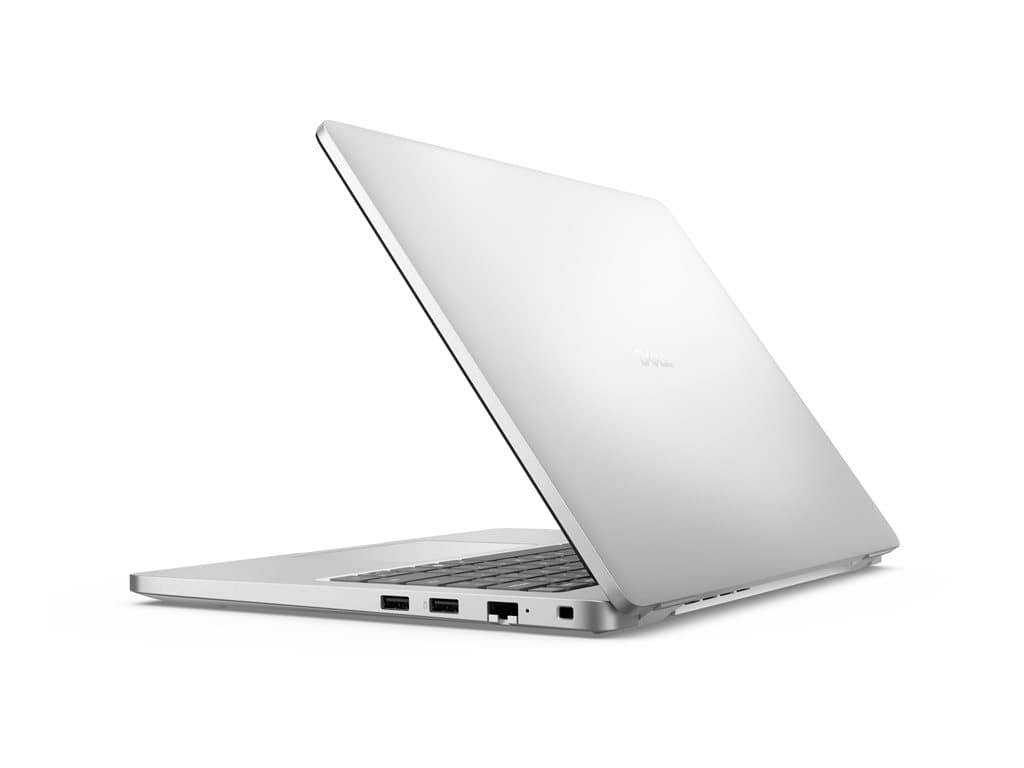
What kind of buyer is the Dell Pro 14 Silver for?
The Dell Pro 14 Silver is a 14-inch business laptop family offered here in several distinctly different configurations. The verified supplier descriptions identify these units as refurbished, so buyers should assess them as refurbished business systems rather than assume they are factory-new stock. Their common specification includes a silver finish, a non-touch 14.0-inch FHD+ display, Windows 11 Pro, integrated graphics, a camera, Wi-Fi, Bluetooth and a backlit UK keyboard.
This combination is most relevant to organisations equipping employees for office applications, browser-based platforms, communication, administration and routine remote work. A 14-inch format can also suit hybrid workers who want a screen larger than a compact ultraportable without moving to a larger desktop-replacement category. Integrated graphics, however, position these configurations primarily for general business computing rather than graphics-intensive professional workloads or gaming.
The family may appeal to small businesses purchasing a few machines, as well as IT teams seeking a consistent Windows 11 Pro platform. Nevertheless, the processor, memory and storage differences are significant enough that the part number must be treated as part of the specification. The Dell Pro 14 Silver family name alone does not identify the exact hardware inside an individual unit.
Verified configurations and their differences
Three supplier configurations are documented. Part number P14180601 combines an Intel Core 3 100U processor with 8GB of RAM and a 512GB SSD. Part number P14081003 uses an AMD Ryzen 3 210, 16GB of RAM and a 256GB SSD. Part number P14230401 pairs an AMD Ryzen AI 7 PRO 350 with 16GB of RAM and a 256GB SSD. All three are listed with integrated graphics, Windows 11 Pro, a silver finish and a non-touch 14.0-inch FHD+ LCD.
The choice is therefore not a simple progression in every respect. P14180601 supplies the largest listed SSD but the least memory. The two AMD versions double the listed RAM to 16GB, while retaining half the storage capacity. P14230401 has the most ambitious processor designation of the three, but buyers should not infer a specific performance advantage without workload-relevant comparative data. No benchmark claims are needed to recognise that these specifications target different priorities.
The supplier also lists a camera, Wi-Fi, Bluetooth and keyboard backlighting for each unit. The keyboard layout is UK, which matters for organisations standardising punctuation and symbol placement or deploying systems to users accustomed to another national layout. A 36-month warranty is stated for all three configurations. Buyers should still confirm the warranty provider, start date, coverage conditions and service process in the final sales documentation.
Practical strengths for business deployment
Windows 11 Pro is a practical advantage where an organisation requires professional operating-system features and a consistent Windows environment. The FHD+ screen specification provides more information than a generic HD label, while the non-touch design may suit fleets that have no requirement for touch interaction. Backlighting can be useful in variable lighting, and the listed wireless connectivity and camera cover basic mobile collaboration needs.
Configuration choice is another strength. A buyer prioritising local file capacity may prefer the 512GB P14180601, provided 8GB of RAM is appropriate for the intended application set. For heavier multitasking, 16GB in P14081003 or P14230401 may offer a more sensible starting specification, although their 256GB drives require tighter storage planning. Cloud storage, application size, local archives and operating-system growth should all be considered before deployment.
Trade-offs and points that require confirmation
There are important limits to the supplied information. It does not verify battery runtime, physical weight, chassis materials, display brightness or colour coverage. It also does not provide a complete port list in the submitted configuration data. These details should not be guessed from the family name or from another Dell model. Buyers who depend on particular monitors, docks, wired networks, card readers or charging arrangements should consult the matching part-number documentation and obtain written confirmation.
The refurbished designation also warrants a condition check. Refurbishment standards can vary, and a long listed warranty does not by itself describe cosmetic grade, battery condition, included accessories or the exact refurbishment process. Integrated graphics may be entirely adequate for mainstream office use, but specialist visualisation, CAD, video production or GPU-accelerated software should be assessed against application requirements.
Buying checklist
- Match the part number: verify P14180601, P14081003 or P14230401 on the quotation and delivered unit.
- Choose the memory and storage balance: compare 8GB with 512GB against 16GB with 256GB.
- Validate software needs: confirm Windows 11 Pro and application compatibility.
- Check the UK keyboard: make sure the layout is suitable for every assigned user.
- Confirm physical connectivity: request the exact port and docking specification for the selected SKU.
- Clarify refurbishment: ask about cosmetic condition, battery assessment, accessories and data sanitisation.
- Verify support: obtain the terms, provider and commencement date of the stated 36-month warranty.
Measured verdict
The Dell Pro 14 Silver is a credible option for organisations seeking a refurbished 14-inch Windows 11 Pro laptop for mainstream business duties. Its value depends less on the shared family name than on selecting the correct balance of processor, RAM and SSD capacity. P14180601 favours storage, while P14081003 and P14230401 favour memory and offer different AMD processors.
A purchase decision should remain conditional on exact SKU verification and confirmation of omitted operational details, especially ports, battery condition and refurbishment grade. With those checks completed, the family provides a clear set of configurations for office and hybrid-work deployment without requiring buyers to pay for unspecified capabilities.