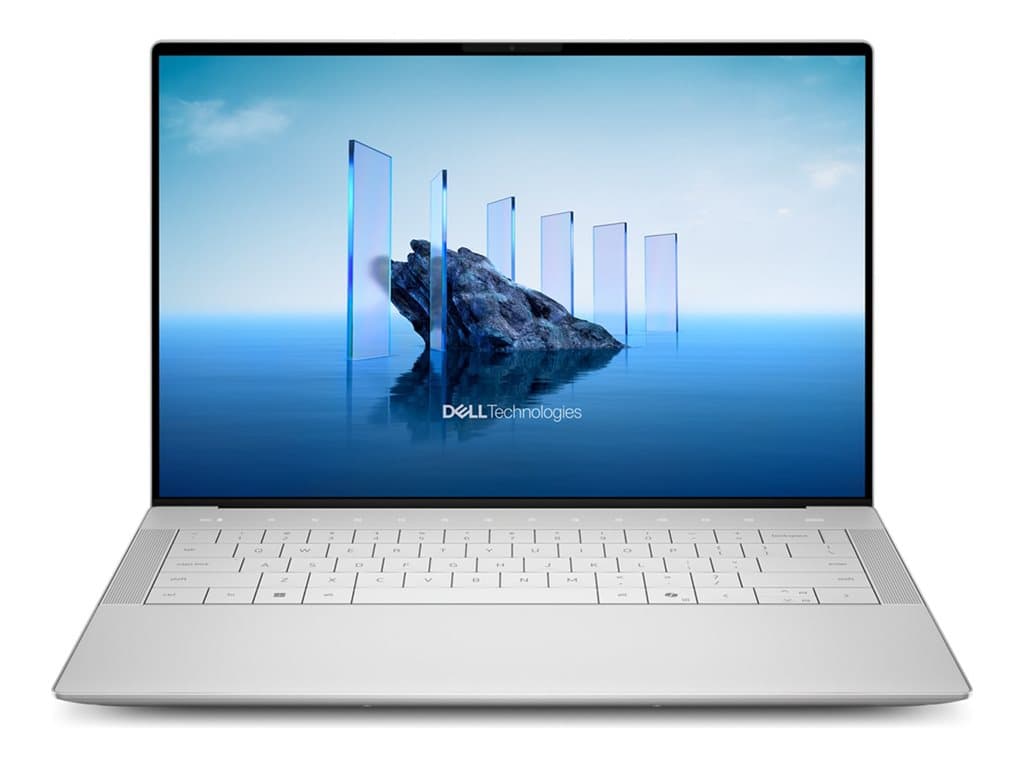
What kind of buyer is the Dell XPS 14 Silver for?
The Dell XPS 14 Silver is a compact, performance-oriented Windows notebook for professionals who want more graphics capability than a conventional office laptop normally provides. The two supplier-verified configurations combine an Intel Core Ultra 7 255H processor, 32GB of RAM and dedicated NVIDIA GeForce RTX 4050 graphics with 6GB of graphics memory. That foundation makes the model relevant to content creators, designers, developers and technical users whose work can benefit from a discrete GPU.
It can also serve managers or consultants who want one computer for office applications, demanding creative software and presentations. However, buying it purely for email, web applications and basic document editing may leave much of its hardware unused. Organisations standardising on managed business systems should pay particular attention to the Windows edition, keyboard layout and refurbished status rather than assuming every XPS 14 Silver SKU is identical.
Verified configurations and the important differences
Part number X14210701 is listed as a refurbished silver model with Windows 11 Pro, an Intel Core Ultra 7 255H, 32GB of RAM, a 1TB SSD and an RTX 4050 6GB GPU. It has a 14.5-inch 2K LCD described as non-touch, plus a UK backlit keyboard and fingerprint reader. The supplier lists a 36-month warranty.
Part number X14210702 retains the same stated processor, memory capacity and dedicated GPU but changes several purchasing-critical details. It has a 14.5-inch 3.2K OLED touch display, a 512GB SSD and Windows 11 Home. It is also listed with a UK backlit keyboard, fingerprint reader, silver finish, refurbished condition and 36-month warranty.
These are the configurations verified in the supplied records, not a promise that every unit sold under the XPS 14 Silver family has those specifications. Individual SKUs, regional versions and future inventory can differ. Match the part number on the quotation or product page to the specification required by your organisation.
Practical strengths
Both options provide 32GB of RAM, which is a useful capacity for substantial multitasking, larger creative projects and development environments. The RTX 4050 6GB is the clearest distinction from an ordinary productivity notebook: compatible applications may use its dedicated graphics resources for visual, rendering or compute workloads. Suitability still depends on the software, project size and its published hardware requirements; the GPU name alone should not be treated as a guarantee of a particular performance level.
The display choice allows buyers to prioritise different needs. X14210701 offers more storage and Windows 11 Pro, while X14210702 combines touch input with a higher-resolution OLED panel. The 1TB model is the more straightforward starting point for locally stored project files. The OLED touch version may be preferable where display characteristics and direct interaction matter more than maximum internal capacity. No battery-runtime claim should be inferred from either display specification.
Trade-offs to consider honestly
The configurations force a meaningful compromise. Choosing OLED and touch reduces the listed SSD capacity from 1TB to 512GB and changes the operating system from Windows 11 Pro to Windows 11 Home. Windows 11 Home may not meet an organisation’s established deployment, security or device-management policy. Buyers should ask their IT team whether a Pro licence or reimaging process would be required.
Both listed units are refurbished, so procurement teams should confirm what the supplier’s refurbishment grade covers, whether cosmetic variation is possible and how warranty service is delivered. A stated 36-month warranty is valuable information, but its provider, geographic coverage, response process and exclusions still need checking. The UK keyboard layout is another practical issue for users accustomed to Lithuanian, Polish or another physical key layout.
The supplied facts do not establish battery life, weight, chassis materials, port selection, acoustic behaviour or performance benchmark results. Those points should be verified in the exact SKU documentation or with the seller if they affect deployment. Avoid filling such gaps with specifications from a visually similar XPS generation.
Buying checklist
- Confirm the part number: X14210701 for 2K non-touch LCD, 1TB SSD and Windows 11 Pro; X14210702 for 3.2K OLED touch, 512GB SSD and Windows 11 Home.
- Check software policy: establish whether Windows 11 Home is acceptable or Pro is mandatory.
- Estimate storage demand: include applications, active projects, local media, recovery space and future growth.
- Validate the display: choose touch and OLED only when those features support the intended workflow.
- Review refurbishment terms: request the condition grade, included items, return conditions and warranty procedure.
- Approve the UK keyboard: make sure the physical layout suits users and internal localisation requirements.
- Verify omitted details: obtain confirmation of ports, wireless features and other deployment-critical specifications before ordering.
Measured verdict
The Dell XPS 14 Silver is a credible option for buyers seeking 32GB of memory and RTX 4050 graphics in a 14.5-inch professional notebook. X14210701 is the more business-ready configuration on paper because it combines Windows 11 Pro with a 1TB SSD. X14210702 makes more sense when a 3.2K OLED touchscreen is the priority and 512GB is sufficient. Neither is universally better: the right choice follows from operating-system policy, display needs, storage planning and acceptance of refurbished equipment.